

Have you ever been curious about how your search queries find exactly what you’re looking for, even amidst an ocean of endless information? It might seem like magic, but there’s some smart technology working behind the scenes — it’s called query routing. In this article, we’ll explore this fascinating concept and show you how it improves intelligence on agent workflows. Plus, we’ll reveal how Epsilla is leveraging query routing to make your AI agents smarter and more accurate.
Understanding Query Routing
So, what exactly is query routing? Imagine it as an intelligent navigation system for your queries. Rather than handling your query with a one-size-fits-all execution workflow, your query is guided directly to the most specific execution path tailored to your needs. This process includes refining your query and selecting the optimal routes to deliver the answers you require.

Why Query Routing Matters
The primary objectives of query routing are clear and impactful:
- Ensuring Specificity: Different types of queries require unique contexts, knowledge, data, and logic. Query routing enables precise execution by directing queries to the most appropriate resources within a compound AI agent framework.
- Delivering Relevant and Comprehensive Results: It’s essential to minimize irrelevant responses (false positives) while ensuring no critical information is missed (false negatives). Query routing achieves this balance, guiding queries to pathways that deliver accurate, complete, and meaningful outcomes.
By accomplishing these objectives, query routing enhances the efficiency and effectiveness of an AI agent framework. It streamlines workflows, optimizes processing, and reduces unnecessary overhead. The result is a smarter, faster, and more capable system that adapts to your needs and delivers actionable insights with precision.
Achieving Query Routing on the Epsilla Platform
Now that we’ve explored the concept of Query Routing and its significance in efficient information retrieval, let’s delve into how you can implement this powerful feature using the Epsilla agent workflow customization without writing a single line of code. We’ll guide you through each step in a clear and concise manner, ensuring you can set up Query Routing effectively.
Today, we’ll create an AI agent designed to handle two specific types of user questions while avoiding unrelated topics. The agent will address:
Questions about COSTCO’s financial situation.
Questions related to the Playboy Enterprise contract.
Step 1: Setting Up the Query Router
To begin, we’ll integrate a router into your workflow to analyze and categorize user queries, directing them to the appropriate downstream agent workflows.
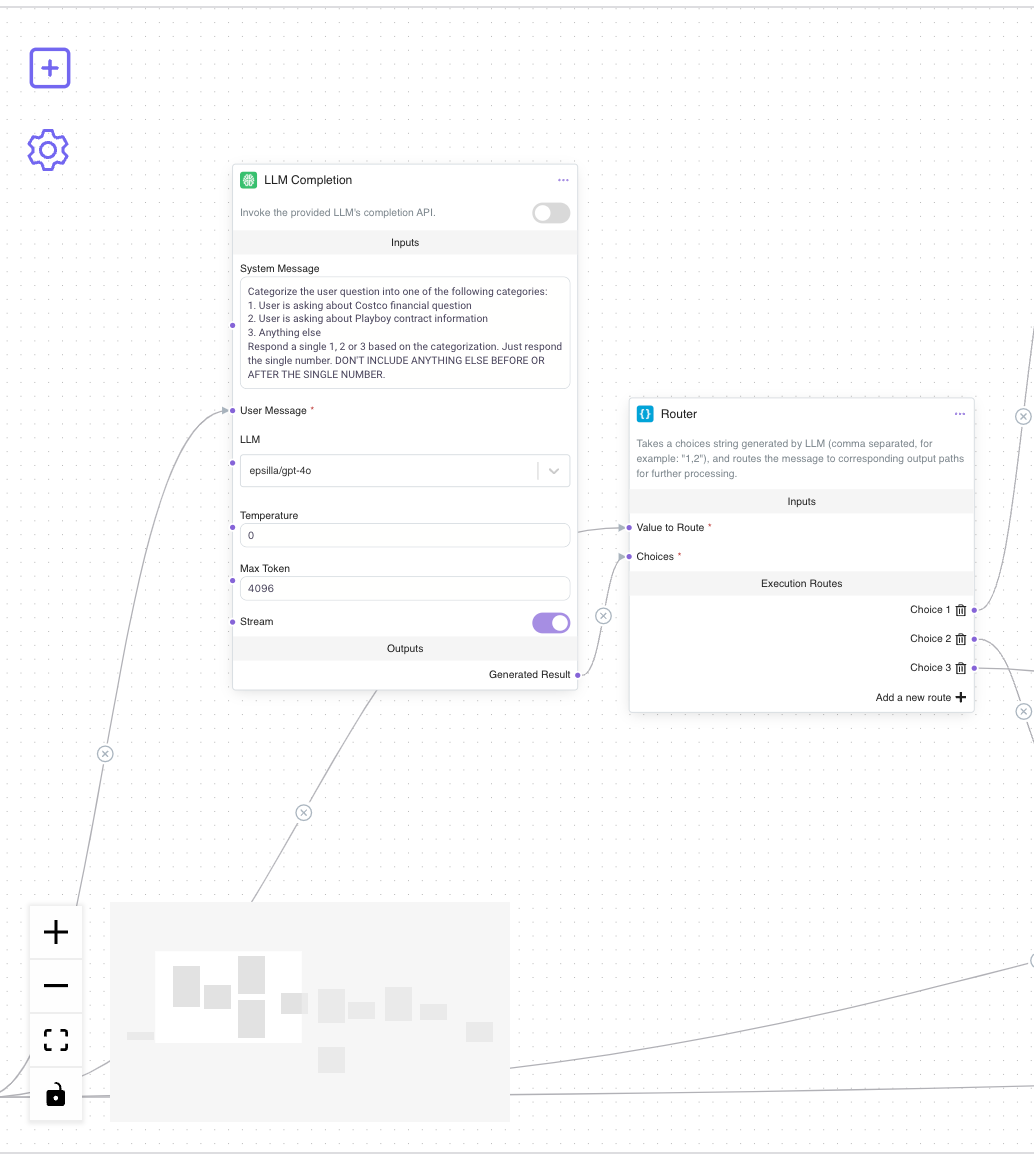
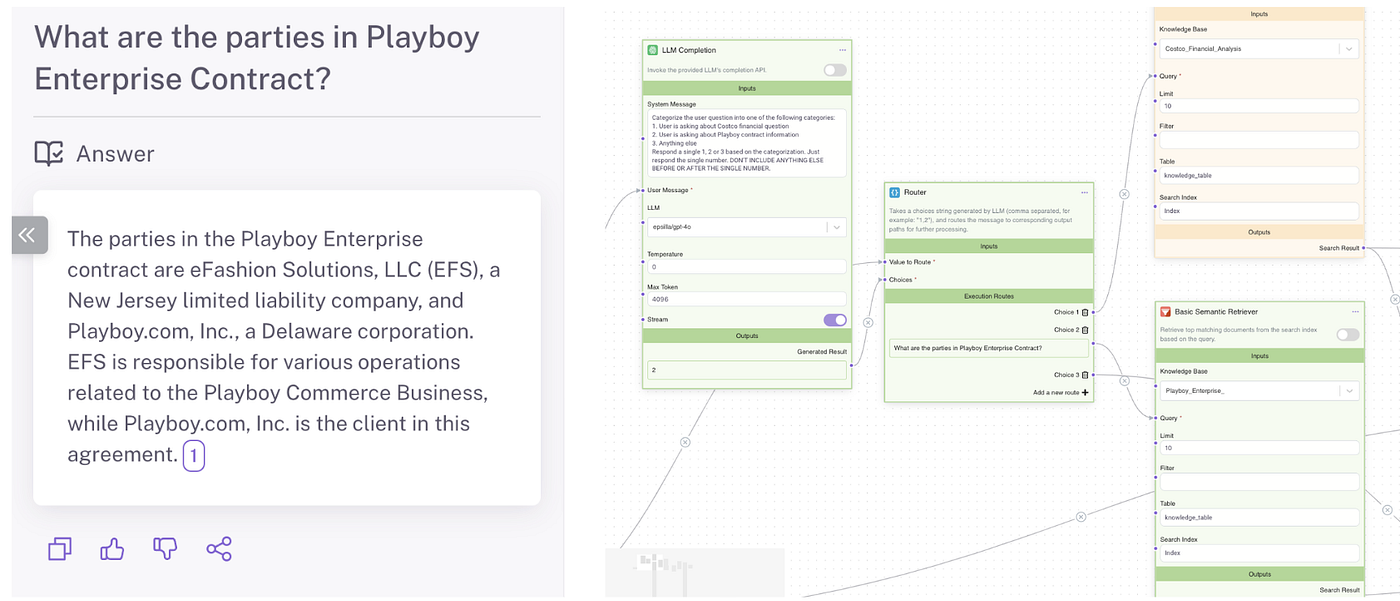
Access the Workflow tab to customize your agent’s operations. In the workflow, insert an LLM Completion Node. This node will analyze the user’s question. Configure the System Message with specific instructions to guide the LLM in categorizing the question. For example:
Categorize the user question into one of the following categories:
1. User is asking Costco financial question
2. User is asking about Playboy contract information
3. Anything else
Respond a single 1, 2 or 3 based on the categorization. Just respond to a single number. DON’T INCLUDE ANYTHING ELSE BEFORE OR AFTER THE SINGLE NUMBER.
Connect the Workflow Input (the user’s question) to the LLM Completion Node. This connection allows the node to receive and categorize the query.
After setting up the LLM node, add a Router Node under the Logic component type to handle the decision-making process. Link the Generated Result from the LLM Completion Node to the Choices input of the Router Node, and connect the Workflow Input (the user question) to the Value to Route input of the Router Node. Define the routing paths based on the categories:
- Choice 1: COSTCO Financial Reports
- Choice 2: Playboy Enterprises’ Contract Agreements
- Choice 3: Unrelated topics
This setup ensures that the user’s question is analyzed and routed to the correct downstream workflow for specific processing logic.
Step 2: Routing Queries to the Downstream Agent Workflows
With the router in place, we’ll now connect it to the respective downstream agent workflows to handle the queries effectively. Here we will leverage different knowledge bases for the two types of queries. For Choice 1 and Choice 2, we create two Basic Semantic Search Nodes that search on Costco_Financial_Analysis knowledge base and Playbot_Enterprise knowledge base respectively. Then we connect the outputs from the Router Node to the Query inputs of these two Basic Semantic Search Nodes.
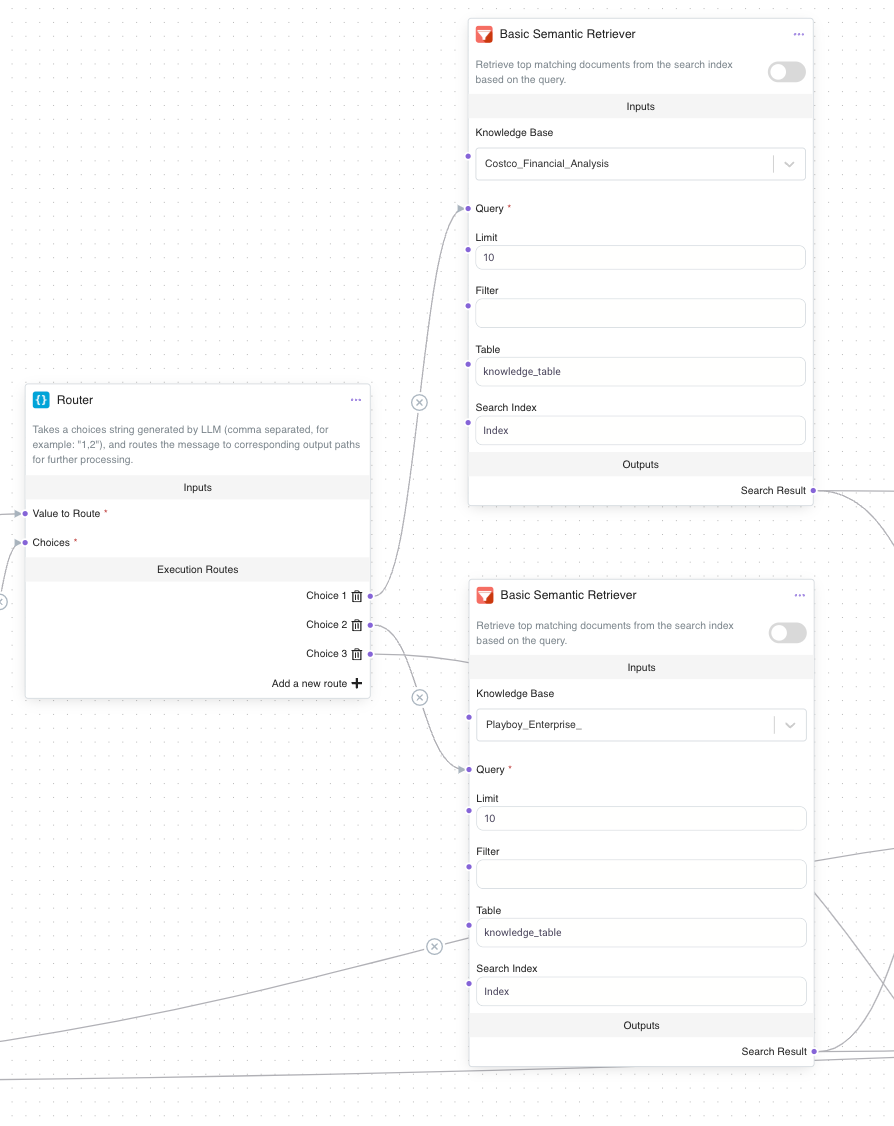
Process the search results by adding a Document String Reducer Node to consolidate the search results from the two knowledge bases. Connect the Search Results output from the Basic Semantic Search Node to the Document String Reducer Node. This node compacts the retrieved documents into a concise format. Although both knowledge bases are connected, only one path will be executed during runtime, so the reduced knowledge string will originate from a single knowledge base.
Next, integrate a String Template Node by connecting the Reduced String output from the Document String Reducer to it. This node formats the final prompt for the LLM to answer the two specified types of user questions.

Step 3: Managing Unrelated Queries
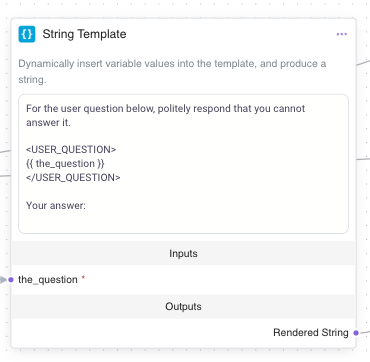
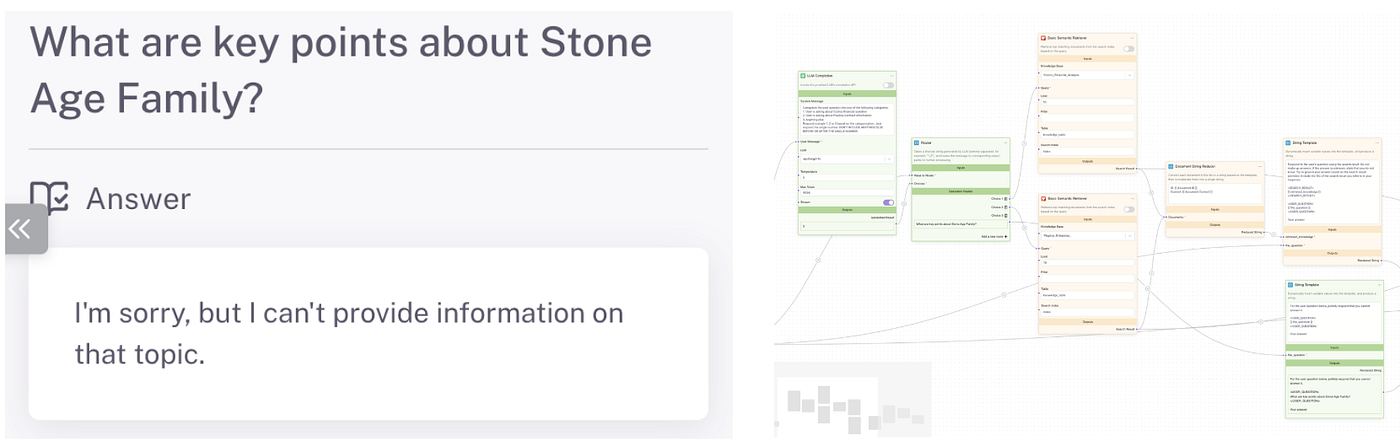
For queries that don’t match either knowledge base (Choice 3), we’ll guide the system to provide an appropriate response. Connect the Choice 3 output from the Router Node to a new String Template Node. Input a message such as:
For the user question below, politely respond that you cannot answer it.
{{ the_question }}
Your Answer:
Step 4: Finalizing the Workflow and Testing
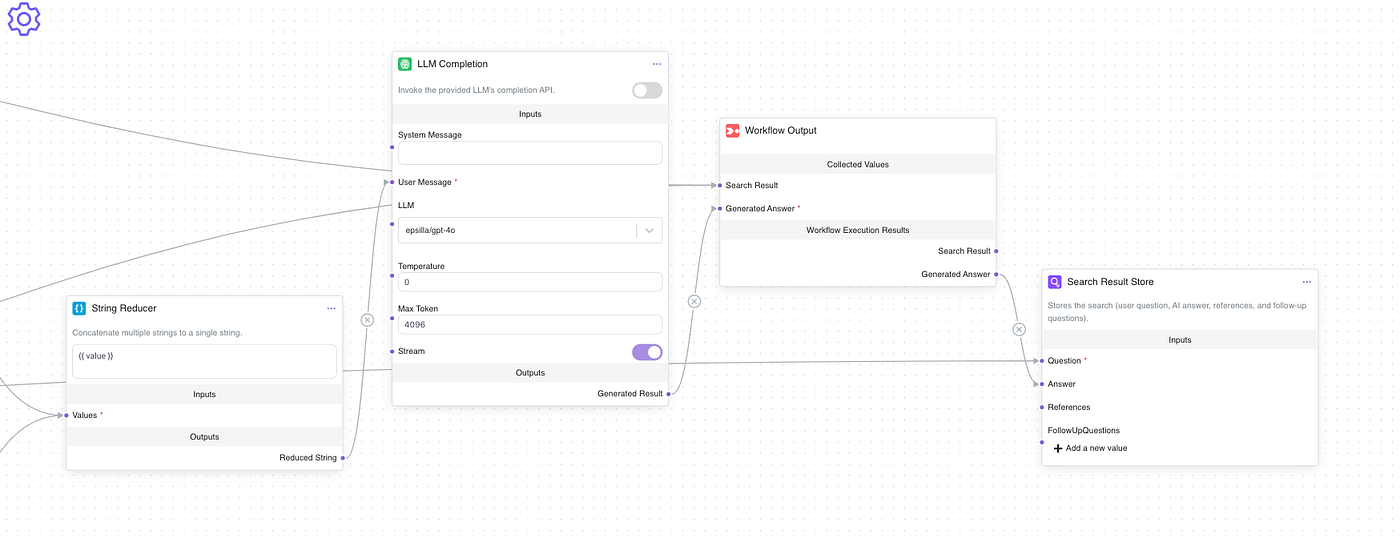
To generate the final answer, use a String Reducer Node to merge the outputs from both the prompt for Choice 1 and Choice 2, and the prompt for Choice 3. Connect this combined string to an LLM Completion Node. This ensures all possible responses are handled within the workflow.
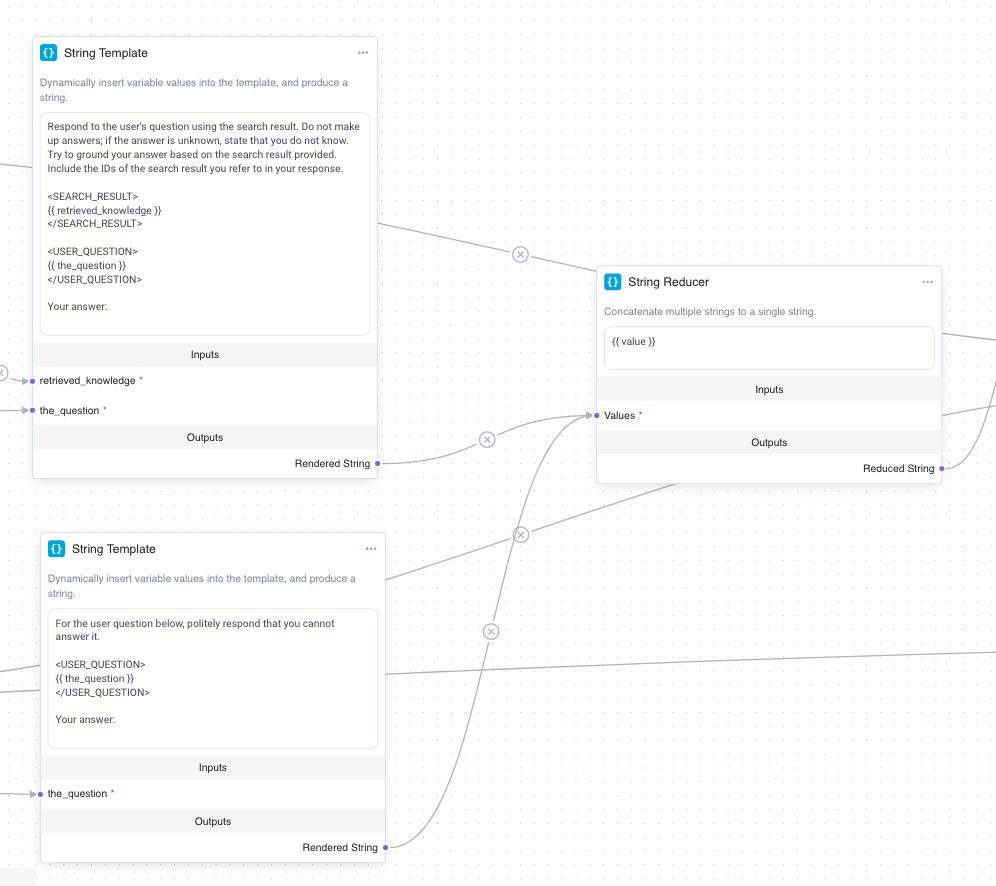
With all paths configured, your workflow is now equipped to handle queries effectively through Query Routing. The LLM Completion Node connected to the String Reducer Node will produce the final answer. Link this to the Workflow Output Node to deliver the response to the user.
Testing On Three Types of Questions
Now, it’s time to test your workflow. Ask a question related to COSTCO Financial Reports; the system should route the query through Choice 1 and provide the relevant answer. Then, pose a question about Playboy Enterprises’ Contract Agreements; the system should utilize Choice 2. Finally, submit a query unrelated to both topics; the system should follow Choice 3 and refuse to answer.
Query 1: A Question about Costco Financial Report

Query 2: A Question about Play Enterprises’s Contract Agreement
Query 3: An Unrelated Question
Results:
The agent, utilizing Query Routing, provided a detailed and informative answer by accurately categorizing and directing the query to the appropriate workflow. It analyzed specific aspects of the question to deliver a comprehensive response.
From the workflow view, you, as an agent builder, can visually observe the executed routes highlighted in green and the skipped paths in yellow. This visual representation makes debugging the agent workflow highly intuitive.
Conclusion
Query Routing is a transformative technology that enhances the accuracy and efficiency of AI agents. By intelligently analyzing and directing user queries to the right execution paths, it reduces irrelevant responses and ensures users receive tailored, precise outcomes. Whether handling detailed financial inquiries, navigating specific contracts, or executing complex tasks within an agent framework, Query Routing ensures high performance while maintaining clarity and focus.
In this article, we explored the concept of Query Routing, its significance, and how to implement it using the Epsilla platform. Through practical steps and a case study, we showcased how it not only improves the quality of responses but also effectively manages out-of-scope queries.
Query Routing isn’t just a technological advancement — it’s a key enabler for smarter, more user-centric AI agent systems. With Epsilla, anyone can harness its power to create intelligent, efficient, and responsive frameworks. Thank you for joining us on this journey to uncover its potential!
Start building trustworthy AI agents for FREE today at [https://epsilla.com](https://epsilla.com)